 Pesgames Download Latest Pro Soccer Games
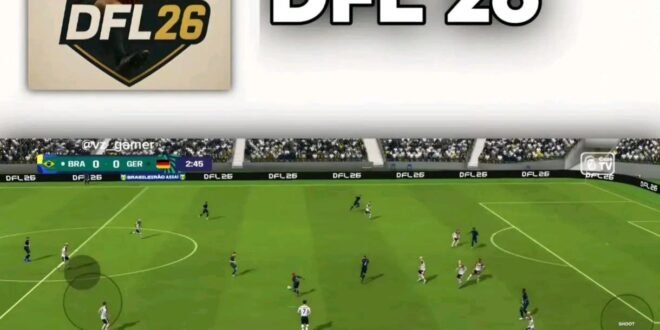
If you are looking for a DFL 2026 Android Game Offline APK, you have probably seen this football game popping up across gaming websites, YouTube and Telegram. DFL 2026 is a modified football game built around the classic FIFA 16 mobile engine, with updated squads, kits, graphics and gameplay designed to give Android users a more modern football experience.
Unlike many current mobile football games that depend heavily on an internet connection, DFL 2026 is promoted as an offline football game. That means you can play regular matches and several game modes without constantly using mobile data.
But before downloading anything, there is an important detail: DFL 2026 is an unofficial fan-made modification and is not an official EA Sports or FIFA release. Current listings describe it as a modified version of FIFA 16.
What Is DFL 2026 Android Game?
DFL 2026 is a football modification created for Android gamers who want updated football content while keeping the classic FIFA 16 gameplay experience.
The mod focuses on bringing newer football seasons into an older football engine. Depending on the particular version, you may find updated player transfers, team kits, competitions, player faces, stadiums and menus.
One reason the game has attracted attention is its offline functionality. Several current DFL 2026 listings describe the game as playable offline, with modes such as Career Mode and Tournament Mode available without a permanent internet connection.
DFL 2026 Game Details
- Game: DFL 2026
- Genre: Football / Sports
- Platform: Android
- Engine: Modified FIFA 16 mobile
- Gameplay: Offline
- Modes: Career, Tournament, Season and other modes depending on version
- Updated: 2025/2026 football season content
- Files: APK + OBB + DATA
- Developer: Unofficial fan/mod creators
- Official EA game: No
Updated 2026 Transfers
One of the biggest reasons players download DFL 2026 is the updated squad content.
Instead of playing FIFA 16 with its original squads, the mod attempts to bring more recent football transfers and team lineups into the game.
This means you can play with modern football stars and updated club squads rather than being stuck with the rosters from the original FIFA 16 era.
Of course, transfers can differ between DFL versions because different mod creators release different updates. So don’t assume every APK advertised as “DFL 2026” contains exactly the same squads.
New Kits and Team Logos
A football game can feel surprisingly old when you’re looking at outdated kits. DFL 2026 attempts to solve that by introducing newer jerseys, badges and visual assets.
Depending on the version, you may find updated kits for major European clubs and other teams.
Some versions also update the game’s menus and presentation to make it look more like a modern football title.
That’s one of the reasons these FIFA 16 mods remain popular: the underlying gameplay stays familiar while the visual content receives a modern makeover.
High-Quality Graphics
DFL 2026 is also promoted with improved graphics, player faces, stadiums and visual elements.
Because it uses the FIFA 16 mobile foundation, don’t expect the game to suddenly become a full console-generation football simulator. However, modded textures and updated assets can make the experience look considerably different from the original game.
Some versions advertise HD player faces, improved stadium graphics and updated broadcast-style presentation.
The final graphics quality will depend heavily on your phone and the particular DFL version you install.
Offline Football Gameplay
This is probably the biggest keyword behind the popularity of DFL 2026:
Offline football.
Modern football games often require an internet connection for authentication, live events, matchmaking, updates or other online features. DFL 2026 takes a different approach by using an offline-focused modified FIFA 16 experience.
You can play matches without continuously consuming mobile data.
That makes it particularly interesting for gamers who don’t always have reliable Wi-Fi or don’t want to spend their data every time they want to play a football match.
However, some versions may require internet access during an initial setup or for downloading additional files or updates. One current listing, for example, says its version requires an initial in-game patch before offline gameplay.
Career Mode
Career Mode is one of the features frequently advertised with DFL 2026.
Instead of simply playing quick matches, you can take control of a club and work through a longer football journey.
Depending on the version, Career Mode can include team management, competitions, transfers and multiple seasons.
This gives the game more replay value because you’re not simply playing the same exhibition match repeatedly.
If you’re the type of player who enjoys building a team over several seasons, Career Mode can become one of the most enjoyable parts of the game.
Tournament Mode
DFL 2026 also includes tournament-style gameplay in various versions.
Tournament Mode lets you compete through structured competitions rather than simply choosing two teams for a random match.
Some versions advertise competitions inspired by major international and club tournaments. The exact competitions available depend on the mod version and its included data files.
So if you download a newer update, check the included feature list before assuming every tournament is available.
Season Mode and Other Game Modes
The DFL 2026 V2 version published by Guypro Gaming lists several modes, including Kick Off, Career Mode, Tournaments, Rival Mode, Season Mode and Challenge Mode.
Kick Off is perfect when you just want to select two teams and start playing.
Career Mode is aimed at longer-term team management.
Season Mode allows you to work through a league campaign, while Challenge Mode adds specific objectives.
Having multiple modes makes the game more interesting because you’re not forced into one style of gameplay.
Smooth Controls
DFL 2026 retains the familiar mobile football control style associated with FIFA 16.
The touchscreen controls allow you to pass, shoot, sprint, tackle and control your players.
The exact control layout can differ depending on the mod. Some versions also advertise adjustable controls, giving players more freedom to customise how they play.
If you’ve played FIFA 16 Mobile before, the basic gameplay should feel familiar.
Android Requirements
DFL 2026 versions have different requirements because the game is modified and distributed by different creators.
One current DFL 2026 V2 listing states Android 6.0 or higher and recommends at least 4GB of RAM, with 6GB suggested for smoother performance.
Other versions advertise compatibility with newer Android releases, including Android 13, 14, 15 and 16.
Don’t assume that one requirement applies to every DFL APK.
Before installation, check the requirements of the exact version you’re downloading.
DFL 2026 APK + OBB + DATA Size
If you’re searching for DFL 2026, don’t expect a tiny 500MB football game.
Current listings report significantly larger files. One DFL 2026 release lists an APK of roughly 44MB, an OBB file around 1.31GB, and Data files that can be several gigabytes depending on the selected version.
Another listing estimates the complete installation at approximately 4–5GB.
Therefore, make sure you have enough free storage before starting the installation.
I’d recommend having several extra gigabytes available beyond the advertised download size because Android may need additional temporary storage while extracting or installing the files.
How to Install DFL 2026 APK + OBB + DATA
The installation process can vary between versions, but the general process is usually straightforward.
Step 1: Download the Required Files
You normally need:
- DFL 2026 APK
- OBB file
- DATA folder or archive
Some versions package the files differently, so follow the instructions provided with the specific release.
Step 2: Install the APK
Install the APK but don’t immediately launch the game if the version requires manual OBB and DATA placement.
Step 3: Extract the OBB
Using a file manager such as ZArchiver, extract the OBB file into the appropriate:
Android/obb/
folder.
The exact folder name depends on the package used by the version you’re installing.
Step 4: Extract the DATA
Place the game’s DATA folder inside:
Android/data/
Again, the exact package folder depends on the APK.
Step 5: Launch the Game
Once the APK, OBB and DATA files are correctly placed, open DFL 2026.
If everything is compatible, the game should load its resources and take you to the main menu.
Some versions may require an initial internet connection or patch before they work completely offline.
Is DFL 2026 an Official EA Sports Game?
No.
This is something every player should understand before downloading it.
DFL 2026 is a fan-made modification based on FIFA 16. It isn’t an official EA Sports title and shouldn’t be confused with EA SPORTS FC Mobile or another officially licensed EA game.
The updated kits, transfers and other modifications are created by modders rather than EA Sports.
Is DFL 2026 Safe to Download?
Because DFL 2026 is an unofficial modification, you should be careful about where you obtain the files.
Not every APK website is trustworthy. A modified APK can potentially contain unwanted software, especially when downloaded from unknown sources.
Before installing:
- Download from a source you trust.
- Scan downloaded files where possible.
- Avoid suspicious “download managers.”
- Don’t provide passwords to APK websites.
- Don’t disable important security features unnecessarily.
- Keep enough storage available.
- Check comments and version information before downloading.
Most importantly, don’t assume that every file labelled “DFL 2026 APK” is the same game.
Final Thoughts
DFL 2026 Android Game Offline APK is an unofficial FIFA 16-based football modification aimed at players who want modern football content without relying on constant internet access.
With updated squads, newer kits, player faces, improved graphics and modes such as Career, Tournament and Season, it offers a different way to enjoy classic FIFA-style gameplay on Android.
The biggest thing to remember is that DFL 2026 isn’t an official EA Sports release. Different versions can also have different file sizes, features, compatibility and installation requirements.
If you decide to try it, check the exact version carefully, make sure your phone has enough storage and avoid suspicious APK sources.
For football fans who miss the classic FIFA 16 gameplay and want a 2026-style offline football experience, DFL 2026 is certainly an interesting mod to explore.
Which team are you using in DFL 2026 — Real Madrid, Barcelona, Manchester City, Liverpool or your own favourite club? Drop it in the comments! ⚽🔥