 Pesgames Download Latest Pro Soccer Games
GTA San Andreas Definitive Mobile Android Game – Features, Gameplay & Download Guide
Remember cruising through Los Santos with CJ, blasting music from the radio while trying not to attract the police? GTA San Andreas Definitive Edition Mobile brings that classic open-world experience to Android with upgraded visuals, modern controls, and a mobile-friendly interface.
Rockstar Games officially released Grand Theft Auto: San Andreas – The Definitive Edition for Android and iOS as part of the Grand Theft Auto: The Trilogy – The Definitive Edition. Rockstar also continues to provide mobile updates and support for the game. (Rockstar Games Support)
So, is the Definitive Edition actually worth playing on Android? Let’s talk about it.
What Is GTA San Andreas Definitive Edition Mobile?
GTA San Andreas Definitive Edition Mobile is an enhanced version of Rockstar Games’ classic open-world action game, adapted specifically for mobile devices.
The story follows Carl “CJ” Johnson, who returns to Los Santos after his mother’s murder. CJ soon discovers that his family has fallen apart, his old neighborhood has changed, and corrupt police officers want to make his life miserable.
From there, the adventure takes you across the entire state of San Andreas.
The mobile version keeps the original open-world structure while adding visual and control improvements designed for modern devices. Rockstar describes the world as covering Los Santos, San Fierro, and Las Venturas, with more than 70 hours of gameplay. (Google Play)
And yes, you still get plenty of cars, missions, weapons, gang wars, ridiculous police chases, and opportunities to completely ignore the mission objective because you found a cool car.
GTA San Andreas Definitive Edition Mobile Features
The Definitive Edition doesn’t simply put the original game onto your phone and call it a day.
Rockstar upgraded several parts of the experience.
Enhanced Graphics
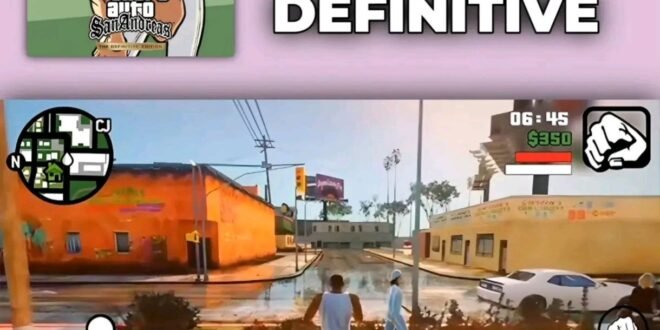
The mobile version includes high-resolution graphics, improved lighting, an enriched color palette, and upgraded character models. (Google Play)
You can notice the improvements across the game’s environments, vehicles, characters, and lighting.
Rockstar also introduced broader visual enhancements across The Trilogy, including improved shadows, reflections, weather effects, environmental details, and increased draw distances. (Rockstar Games)
Of course, don’t expect GTA V-level graphics from a game originally released in the early 2000s. Your phone isn’t secretly carrying a PS5 inside it.
But compared with the original version, the Definitive Edition gives San Andreas a more modern appearance.
Open-World Gameplay
The biggest reason people still love GTA San Andreas involves freedom.
You don’t have to spend every minute completing story missions.
You can explore the cities, drive around, customize CJ, find collectibles, visit different locations, participate in side activities, or simply cause enough chaos to make the police regret their career choice.
The map includes three major cities:
- Los Santos
- San Fierro
- Las Venturas
You also travel through rural areas, highways, deserts, countryside locations, and smaller communities.
That variety makes the map feel much larger than a simple city-based game.
CJ and the San Andreas Story
At the center of everything sits Carl Johnson.
CJ returns to Los Santos after spending years away from home. His return quickly becomes complicated when he discovers that his family has fallen apart and his neighborhood has become dangerous.
A couple of corrupt police officers also frame him for homicide, forcing CJ into a dangerous journey across San Andreas.
The story combines:
- Family drama
- Gang conflicts
- Corruption
- Betrayal
- Friendship
- Crime
- Rivalries
- Business
- Action
The story remains one of the strongest parts of the game because it gives you reasons to explore the enormous world rather than simply wandering around aimlessly.
Modern Controls on Android
Touchscreen controls can make older console games feel awkward, but Rockstar adapted the Definitive Edition for mobile.
The Android version includes dual analog stick controls for movement and camera control. It also offers different control schemes and customizable controls. (Google Play)
That customization matters because everyone plays differently.
Some players prefer larger buttons, while others want a cleaner interface that takes up less screen space.
Controller Support
Don’t enjoy touchscreen controls?
The game supports compatible wireless and USB gamepads, giving you a more traditional console-style experience. (Google Play)
Personally, I’d choose a controller if I planned to play for several hours. Driving and shooting can feel much more comfortable when you have physical buttons.
Offline Gameplay
One of the biggest advantages of GTA San Andreas Definitive Edition Android involves its single-player experience.
The Google Play listing categorizes the game as offline, meaning you can enjoy its core single-player experience without constantly needing an internet connection. (Google Play)
That’s great for mobile gamers who don’t always have reliable Wi-Fi or mobile data.
You can download the legitimate game, install the necessary files, and enjoy the story without turning every gaming session into a network test.
Graphics Settings
Your Android phone doesn’t necessarily need to run the game at maximum settings.
The mobile version provides adjustable visual settings, allowing you to tailor the experience to your device. (Google Play)
If you have a powerful phone, you can push the visual settings higher.
If you use a weaker device, lowering demanding settings can help maintain smoother gameplay.
Tips for Better Performance
Try these simple steps if you experience performance problems:
- Close unnecessary background apps.
- Keep enough free storage available.
- Restart your phone after installing the game.
- Avoid excessive background downloads.
- Lower graphics settings if you experience stuttering.
- Keep the game updated.
- Avoid playing while your phone becomes extremely hot.
Rockstar itself recommends restarting your device after downloading and closing other applications while playing. (Google Play)
GTA San Andreas Definitive Edition Android vs Original
So, how much has actually changed?
| Feature | Original San Andreas | Definitive Edition Mobile |
|---|---|---|
| Graphics | Classic graphics | Enhanced mobile graphics |
| Lighting | Original lighting | Improved lighting |
| Character models | Original | Upgraded models |
| Controls | Console controls | Touch + customizable controls |
| Camera | Original system | Modernized mobile controls |
| Game world | San Andreas | San Andreas |
| Story | Original CJ story | Same core story |
| Offline | Yes | Yes |
| Controller support | Console controller | Compatible mobile gamepads |
| Cloud saves | No original mobile system | Available for Social Club members |
The Definitive Edition focuses more on improving presentation and usability than completely reinventing the game.
GTA San Andreas Definitive Edition vs Netflix Version
You may also encounter GTA: San Andreas – NETFLIX when searching for the Android version.
Netflix offers the Definitive Edition as part of its mobile gaming catalog, while Rockstar also offers the game through standalone mobile distribution. The Netflix version requires a Netflix membership. (About Netflix)
The Netflix version also includes the same major Definitive Edition concept: enhanced lighting, high-resolution textures, increased draw distance, and GTA V-style controls and targeting. (Google Play)
So, which option makes sense?
If you already have a Netflix membership, checking the Netflix Games version can make sense. If you don’t, you can look at the standalone mobile release instead.
Android Installation Guide
If you’re searching for GTA San Andreas Definitive Edition Android download, the safest approach involves using an official store or legitimate Rockstar-supported distribution.
The current Google Play listing identifies Rockstar Games as the developer and offers the standalone Android game. (Google Play)
Basic Installation
- Open Google Play on your Android phone.
- Search for Grand Theft Auto: San Andreas.
- Confirm that Rockstar Games appears as the developer.
- Check your device compatibility.
- Purchase and install the game.
- Download the required game data.
- Launch the game.
- Adjust graphics and controls.
- Start your story.
You can also access the Definitive Edition through Netflix if you have an eligible membership. (About Netflix)
Should You Download a Mod APK?
You will probably find websites advertising phrases such as:
- GTA San Andreas Definitive Edition APK
- GTA SA MOD APK
- GTA San Andreas unlimited money
- GTA SA OBB download
- GTA San Andreas free download
I’d be careful.
Unofficial APKs can contain modified files, outdated versions, unwanted software, or other security risks. You also lose the reliability that comes with getting the game from an official source.
If you’re going to spend hours building CJ’s criminal empire, there’s little reason to risk your phone for a suspicious APK.
Android Performance
Performance depends heavily on your phone.
A newer Android device with a capable processor and sufficient RAM should generally provide a better experience than an older entry-level phone.
Your phone’s:
- Processor
- GPU
- RAM
- Android version
- Available storage
- Thermal performance
can all affect gameplay.
If your phone starts heating heavily, reduce the graphics settings and give the device a break.
Also remember that Rockstar continues to issue mobile updates. Its support page lists mobile title updates for the Definitive Edition, including Android updates and general fixes. (Rockstar Games Support)
Is GTA San Andreas Definitive Edition Worth It?
For someone who loves open-world games, absolutely.
The original San Andreas already delivered an enormous amount of content. The Definitive Edition adds improved visuals and modern mobile controls, making the experience more convenient on current Android devices.
The game also doesn’t rely on multiplayer to remain interesting.
You get a huge single-player campaign, side activities, exploration, vehicles, weapons, character customization, and plenty of ridiculous moments.
Want to spend 20 minutes driving around instead of completing the next mission?
Nobody’s stopping you.
That’s the beauty of San Andreas.
Final Verdict
GTA San Andreas Definitive Edition Mobile Android remains one of the most substantial open-world games available for mobile gamers.
You get CJ’s complete story, three major cities, an enormous open world, improved graphics, modern controls, controller support, customizable visual settings, and offline single-player gameplay. (Google Play)
The Definitive Edition doesn’t transform San Andreas into a brand-new GTA game, but it gives the classic adventure a more modern mobile presentation.
If you’re a longtime GTA fan, it offers a great excuse to revisit Los Santos. If you’ve never played San Andreas before, Android gives you a convenient way to experience one of Rockstar’s most memorable open-world adventures.
And let’s be honest: sometimes the mission can wait.
CJ has a car to steal.